
In your Hyperspace settings, go to your App Settings:
Under your scheduling jobs...

Look for this setting:
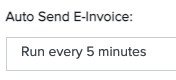
Turn that setting to 'Disabled'. That will stop emails from being automatically sent to your customers.
In your Hyperspace settings, go to your App Settings:
Under your scheduling jobs...
Look for this setting:
Turn that setting to 'Disabled'. That will stop emails from being automatically sent to your customers.